My Products
The My Products page lists the products your organization has assigned to you. Products cannot be created or edited by vendors — they are created and assigned by the organization.
Assigned Products
Each row shows the product name, version, category, and an SBOM status badge (for example, whether a current SBOM has been submitted). Click the arrow to open the product's detail page, or the upload icon to jump straight to the SBOM upload form for that product.
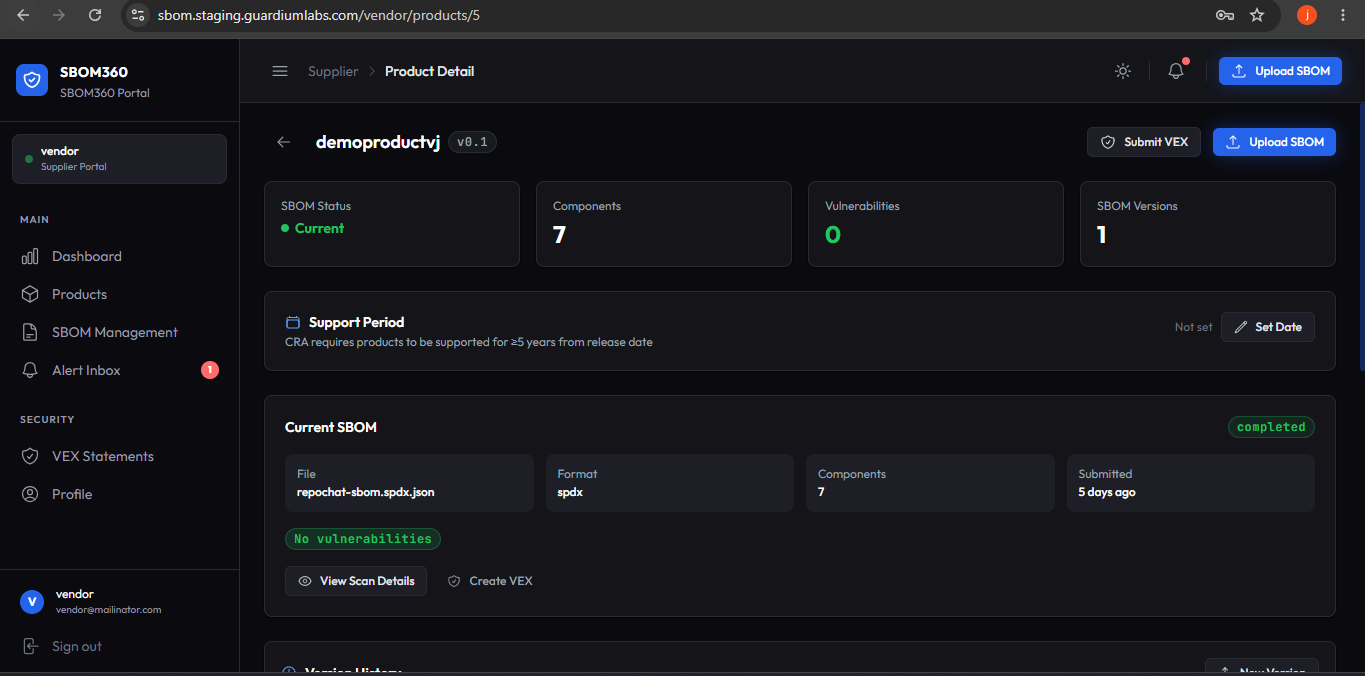
Product detail page (vendor view)
| Section | Description |
|---|---|
| SBOM Status / Components / Vulnerabilities / SBOM Versions | Four metric cards summarizing the current SBOM's scan status, component count, vulnerability count, and total number of versions submitted. |
| Support Period | The end date of your committed support window for this product. Products should be supported for at least five years from release. Click Set Date or Edit to record or update it; a warning appears if the remaining support period is under five years. |
| Current SBOM | File name, format, component count, and time since submission for the latest SBOM, plus its vulnerability breakdown by severity. View Scan Details and Create VEX buttons link to the relevant pages. |
| Version History | Every SBOM submitted for this product, most recent first, each with format, component count, file size, and vulnerability summary. Click New Version to upload another. |
| CI/CD Integration | Ready-to-copy GitHub Actions or GitLab CI snippets for automating SBOM uploads from your build pipeline. |
Available actions
- Submit VEX — opens the VEX submission form pre-filled for this product.
- Upload SBOM — opens the SBOM upload form pre-filled for this product.
Warning: If your support period is less than five years from today, a warning banner appears. Update the support end date once you can commit to a longer window.